
Is Hunter.io Right for Consultants and Online Service Providers?
A Precision-Based Outreach Analysis
Hunter.io is different from every other tool in this category.
Apollo, Lemlist, Woodpecker — those are sequencing platforms that happen to include list-building features.
But Hunter is the reverse: a list-building and email-finding platform that happens to include basic campaign functionality.
I'll be upfront:
I use Hunter myself. Regularly.
It's part of my own outreach stack, and both of my software tools — Architect and Cambium — use Hunter under the hood to find and verify email addresses.
So this isn't a skeptical review. It's a nuanced one.
Hunter is a genuinely useful tool. The question isn't whether to use it — it's how you use it. Because it's also easy to use it in a way that quietly imports Volume-Based Outreach logic into a precision approach, and that's where things go sideways for consultants and online service providers.
That distinction is what this post is about.
← Back to: Cold Email Software for Consultants and Online Service Providers
What Hunter Is Designed For
Consider this: Hunter's core product is deceptively simple.
You have a company or domain. You want to find the email addresses of people who work there. Hunter finds them, verifies them, and hands them to you.
That's the foundation. From there, Hunter has expanded into adjacent territory: bulk email finding across multiple domains, email verification at scale, a basic cold email campaign tool, a B2B contact database (Discover), and an AI writing assistant.
But the DNA is still email finding and verification. Over 6 million professionals use Hunter, and the primary use case for most of them is the same: I know who I want to contact, and I need their email address.
The tool was built to solve a specific, tactical problem — finding verified contact information — and it does that job cleanly. The campaign features exist to keep users in the platform, but they're not where Hunter's reputation was built.
That narrow, focused purpose is actually Hunter's most interesting characteristic for consultants and online service providers. It's worth examining carefully.
The Outreach Model Behind Hunter
Hunter is a list-building tool. And list-building tools, by design, carry Volume-Based Outreach assumptions — even when they're not sequencing platforms.
Here's how the three biases show up:
Scale bias. Hunter's credit system — 500 searches on the Starter plan, 2,500 on Growth, 10,000 on the Business plan — is built around the assumption that you're finding a lot of contacts, regularly. The bulk domain search, the bulk email finder, the CSV export — all of it is optimized for building large lists efficiently. The tool rewards volume use. The more contacts you find, the more value you extract from the subscription.
For a consultant or online service provider doing Precision-Based Outreach who needs to find 15–30 highly specific contacts per month, the Starter plan is significant overkill.
You're paying for scale capacity you don't need.
Automation bias. Hunter's bulk features — domain search returning hundreds of contacts at once, bulk verification across CSV imports, automated lead enrichment — are built to remove the manual work of finding contacts one at a time. The underlying assumption: finding contacts should be fast, because you need a lot of them.
Precision-Based Outreach inverts that assumption.
Finding the right 20 contacts should be thorough, not fast. The judgment work of evaluating whether each person is actually worth reaching out to is what makes the list valuable — not the speed at which it was assembled.
SDR team assumption. Hunter integrates natively with Salesforce, HubSpot, and other CRMs, and supports unlimited team members on all paid plans.
The workflow it was designed for: a sales team building lists in Hunter, pushing them to a CRM, and handing them off to an SDR for sequencing.
That's a team workflow, not a solo consultant or online service provider workflow.
Where Hunter Works Well
Truth is, Hunter does specific things genuinely well — and for the right operator, it's a clean, efficient tool.
Sales teams that have already figured out their ICP and need a reliable way to find and verify email addresses at volume benefit from Hunter's core product.
The data quality is strong. The verification is fast. The interface is clean.
For teams running Apollo or Lemlist and needing a reliable email-finding layer on top, Hunter fits that role well.
Recruiters doing outbound to passive candidates — finding contact information for specific people at specific companies — use Hunter effectively because the email finder operates on exactly the inputs a recruiter has: a name and a company.
PR professionals and journalists use Hunter to find editorial contacts at specific publications.
Same logic: specific person, specific organization, need the email.
Agencies building targeted lists for client campaigns benefit from the bulk domain search and the B2B Discover database, which makes it possible to find contacts across multiple client target lists efficiently.
The pattern: you know who you're looking for, you need their contact information, and you're doing that at enough volume to justify a subscription.
The Judgment Gap for Consultants and Online Service Providers Using Hunter
Here's where it gets nuanced — because Hunter is genuinely more compatible with Precision-Based Outreach than the other tools in this cluster. Used correctly, it can support a precision approach rather than undermine it.
But there's a specific trap.
The Judgment Gap is the space between access to automation and strategic client selection. It occurs when consultants and online service providers outsource decision-making to tools built for volume.
With Hunter, The Judgment Gap doesn't show up in the sequencing layer — because Hunter doesn't sequence. It shows up in how you use the list-building layer.
Here's the scenario:
You use Hunter's Discover database or domain search to build a list. The tool makes it easy to find 200 contacts in a specific industry, role, and company size range. The list looks solid. The emails are verified. You export it and load it into your sequencing tool.
And somewhere in that process, the judgment question got skipped: Are these 200 people actually worth reaching out to?
Hunter's efficiency makes it easy to skip that question. The tool is so good at finding contacts quickly that the speed of list-building outpaces the rigor of list evaluation. You have a verified list of 200 people... but you haven't done the work of understanding whether any of them are actually a fit for what you offer right now.
That's how volume logic enters a precision approach — not through a sequencing tool, but through a list-building tool that rewards speed over selectivity.
Used the other way — finding the verified email address of a specific, already-researched person you've decided is worth contacting — Hunter is genuinely useful for precision outreach. The question is which direction you're running the process: judgment first, then finding the contact; or finding the contact, then hoping the judgment follows.
For consultants and online service providers, it should always be judgment first.
What Hunter Actually Costs a Consultant or Online Service Provider
Hunter is the most affordable tool in this category by a meaningful margin. But the same time-cost logic applies.
Subscription Cost
Hunter's paid plans in 2026:
Free: 25 searches/month, 50 verifications — enough to test, not enough to use seriously
Starter: $34/month (annual) or $49/month (monthly) — 500 searches, 1,000 verifications, 3 connected email accounts, campaigns to 2,500 recipients/month
Growth: $69–$104/month (annual vs. monthly) — 2,500 searches, 5,000 verifications, 10 email accounts
Business/Scale: $209–$299/month — 10,000–25,000 searches
For a solo consultant or online service provider doing precision outreach, the Starter plan at $34/month is almost certainly more than enough.
500 searches per month is 500 contacts you could potentially find — far more than a precision approach requires.
Additional costs: extra email accounts at $10/month each beyond the plan limit; credit overages at $0.10 per search if you exceed your monthly allowance. Unused credits on monthly plans expire — they don't roll over.
One note: Hunter's recent simplification to a single credit pool (previously separate search and verification credits) makes it easier to manage but means heavy use of one function can eat into the other.
Realistic subscription cost for a solo consultant or online service provider: $34–$49/month. Low. Not the expense.
Time Cost
Setup hours: Hunter is one of the simplest tools to set up in this category.
Account creation, email account connection, Chrome extension install, basic configuration — call it 2–4 hours to be fully operational.
At $150/hour: $300–$600 in setup time. At $250/hour: $500–$1,000.
Significantly lower than Apollo, Lemlist, or Woodpecker.
Weekly usage time: This is where it gets interesting. How you use Hunter determines your time cost.
If you're using it for precision outreach — finding the verified email of a specific person you've already researched and decided to contact — Hunter adds maybe 5–10 minutes per contact. Low overhead, high value.
If you're using it to build large lists efficiently — domain searches, bulk exports, CSV uploads — the time cost is low per contact but the list evaluation work happens separately, outside the tool. And that evaluation work — the judgment work of deciding who on that list is actually worth contacting — is where the real time goes.
Weekly management: Hunter has minimal ongoing management compared to sequencing tools. No sequences to monitor, no deliverability to troubleshoot, no warm-up to manage. If you're using Hunter purely as an email finder and handing off to a separate sequencing tool, the ongoing time cost is close to zero.
If you're using Hunter's built-in campaign features, add 1–2 hours per week for management — less than dedicated sequencing tools, but still real.
At $150/hour and 2 hours/week: $1,200/month.
At $200/hour, that’s $1,600/month.
Strategic Cost
Volume pressure: Lower than other tools in this cluster, but present. Hunter's credit system subtly encourages using your monthly allowance — unused credits on monthly plans disappear. For precision outreach, that pressure is mostly harmless because you're unlikely to hit your limit anyway. But it's worth naming.
Reputation risk: Hunter itself doesn't create reputation risk. What creates reputation risk is what you do with the contacts you find. A fast, efficient list-building process combined with a poorly targeted or generic outreach message is where reputation gets damaged — and Hunter's efficiency makes that specific mistake easier to make.
Decision outsourcing: Hunter's Discover database and bulk domain search make it easy to outsource the "who" decision to the tool's filters. Which job titles, which company sizes, which industries — set the parameters and Hunter returns the contacts. That's useful for volume outreach. For precision outreach, the "who" decision should come before you open Hunter, not as a result of running filters inside it.
Cognitive overload: Minimal. Hunter is genuinely simple. This is a real advantage over more complex platforms.
The actual math
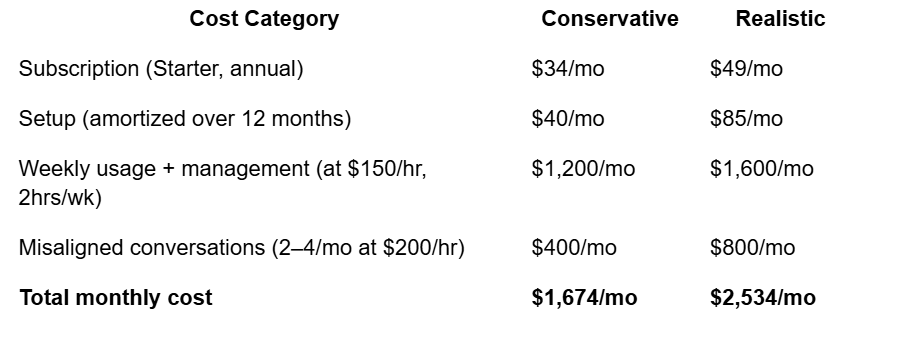
Lower overall than the sequencing platforms — because Hunter is a simpler tool with lower management overhead.
The subscription is still not the expense.
Your time still is.
When Hunter Makes Sense
Hunter makes sense in more situations than the other tools in this cluster, because its core use case — finding and verifying a specific person's email address — is genuinely useful regardless of your outreach model.
If you already know who you want to contact and just need their email address, Hunter's Email Finder is one of the cleanest ways to get it.
That use case is model-agnostic.
If you're a solo consultant or online service provider running precision outreach and you want a simple, low-overhead tool for finding contact information on a small number of carefully selected prospects each month, the free plan or Starter plan is a reasonable fit.
If you're using another sequencing tool (your own setup, or a separate platform) and need reliable email verification before sending, Hunter's verifier is strong and affordable at this price point.
If you're an agency building client contact lists and need bulk domain search and verification capability, Hunter's mid-tier plans are genuinely cost-effective.
The key distinction: Hunter makes sense as a tactical, targeted tool for finding specific contacts. It makes less sense as a strategic platform for building your outreach system around — because it wasn't designed to hold that role.
If You're Playing a Precision Game Instead
Here's what's worth saying plainly about Hunter — and I can say this from experience, because I use it myself.
Of all the tools in this cluster, Hunter is the one most compatible with Precision-Based Outreach. It's part of my own stack. Both of my software tools use Hunter to find and verify email addresses. I'm not recommending it from a distance.
Used correctly: you've already done the judgment work. You've identified a specific person, at a specific company, in a specific situation, who you've decided is worth reaching out to. You need their email address. Hunter finds it. You write the email. You send it.
That's a precision workflow. Hunter plays a small, appropriate role in it — the same role it plays in mine.
Used incorrectly: you use Hunter's filters and bulk search to build a list of 300 people, and then figure out who's worth contacting afterward.
That's volume logic. And it's easy to fall into because the tool makes list-building so efficient that it's tempting to let the list come first and the judgment come second.
The order matters.
Precision-Based Outreach is judgment first, then finding. Not finding first, then hoping the judgment follows.
If you're running a precision approach — 15–30 carefully selected prospects per month, outreach that reflects genuine knowledge of their situation — Hunter can be a useful, low-overhead tool for one part of that process.
But the tool can't do the hard part. The hard part is deciding who those 15–30 people are and why they're worth your time. That's The Judgment Gap. And no email finder closes it.
If You're Realizing the Problem Isn't the Software
Hunter is actually the tool I'd most readily recommend to a consultant or online service provider in this category — not because it's perfect, but because its simplicity limits the ways it can lead you astray, and because it plays well in a precision stack when you're using it right.
And yet the Judgment Gap still shows up. Because the problem was never which tool you were using. It was which outreach model you were running — and specifically, whether judgment is coming before or after the list.
If that's landing for you...
come see what the full precision model looks like.
This Thursday at 1pm MT, I’m running a free, live training called Never Stare at a Cold Email Again.
It's not a pitch or a replay dressed up as a “live, on demand” webinar.
This is a live training on what we've been talking about here:
Why volume works for SaaS but quietly breaks down for consultants and online service providers — and why that's a model problem, not a tool problem.
How to close The Judgment Gap — including the part that happens before you ever open a list-building tool.
How to run Precision-Based Outreach in 3 hours a week — the exact framework I use and help you install inside The WARM Client Method, live, so you can see it work before you invest a dollar.
The right tool for the wrong model still produces the wrong results.
Come see what the right model looks like instead.
→ Register for Never Stare at a Cold Email Again — free training on Thursday at 1pm MT
Also in this series: [Apollo] · [Lemlist] · [Woodpecker] · [ListKit]
← Back to: Cold Email Software for Consultants and Online Service Providers